


Zakat payroll deductions need employee approval – not an automatic deduction for every Muslim employee. Before I process one, I check the state zakat authority, authorised amount and any required labour approval.
My payroll checklist covers four steps:
- Set up: Keep consent, payment details and a separate zakat deduction code.
- Process: Show the deduction on the payslip, remit it by the authority’s deadline and confirm receipt.
- Check tax reporting: Keep zakat separate from PCB, apply adjustments under current HASiL rules and avoid counting personal payments twice.
- Keep records: Reconcile EA Form totals, check December payment dates and securely retain payroll and tax records for seven years, subject to the applicable retention rules.
The point I keep in mind: <u>deducting zakat is not the same as completing payment</u>. I need the authority’s confirmation, even when payroll is outsourced. And any qualifying tax rebate is capped at the income tax charged.
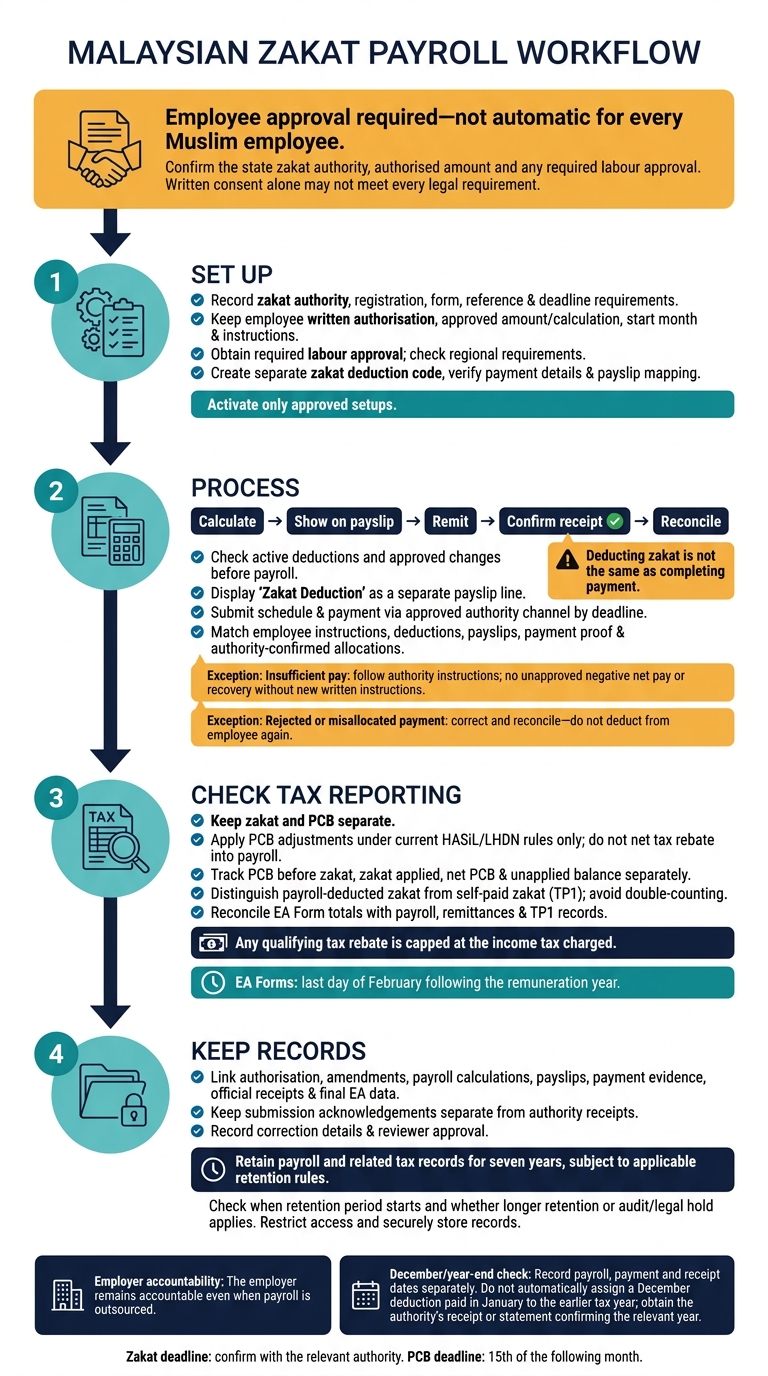
Zakat Payroll Deduction: Approval to Reporting
Zakat Payroll Rules and Responsibilities
Before setting up payroll, confirm the deduction rules, employee consent and who is responsible for each step.
Employee-funded zakat is a pass-through deduction, not an employer contribution. It does not replace EPF, SOCSO, EIS or other statutory deductions. Set the deduction rule before configuring payroll.
Confirm the Zakat Authority and Employee Consent
Record the employee’s chosen zakat authority and calculation basis. Check whether the authority requires employer registration, an authorisation form, payment references or a fixed remittance deadline. Use the amount authorised by the employee and accepted by the authority.
Written consent alone may not meet every legal requirement. Under section 24 of the Employment Act 1955, salary deductions paid to a third party usually require the employee’s written request and any required labour approval. Confirm the requirements with the relevant labour office, including regional rules for employees in Sabah or Sarawak.
The authorisation should state the amount or calculation basis, start month, and process for changing or cancelling the deduction. Confirm the authority and consent requirements before moving to payroll setup.
Understand Zakat, PCB and Tax Rebates
Keep zakat separate from PCB and year-end tax reporting.
Use separate payroll codes and payment totals for zakat and PCB. Do not net the tax rebate into payroll deductions. Apply any PCB adjustment under the applicable rules.
Also, distinguish payroll deductions from zakat paid personally and reported through TP1. Do not show personal payments as payroll deductions on the payslip or EA Form. Check payment evidence against payroll records to avoid double-counting and keep payslips, EA Forms and tax records aligned.
Define Each Party’s Responsibilities
Assign responsibility for approvals, payments and records before starting setup and monthly processing.
| Party | Authorisation and amount | Processing and payment | Records and tax documents |
|---|---|---|---|
| Employee | Authorised amount and calculation basis | Payslip review and change requests | Personal receipts and TP1 payment details |
| Employer | Legal basis and process approval | Remittance oversight, including outsource payroll | Consent, payment evidence and reporting oversight |
| Payroll administrator | Deduction setup and effective month | Monthly deductions, remittances and reconciliation | Audit trail and payslip/EA Form mapping |
| Zakat authority | Scheme rules and prescribed forms | Receipt through approved channels | Official receipts or payment confirmation |
The employer remains accountable even when payroll is outsourced. Assign someone within the business to approve the payroll register, check remittance evidence and follow up on rejected payments. A payroll deduction is not complete until the authority confirms receipt.
sbb-itb-ba278e7
Set Up Zakat Deductions
Collect Authorisation and Payment Details
Once roles and rules are set, build the payroll record using the authority’s approved details. Use its prescribed form where required to record:
- Employee name, ID number and payroll number.
- Employer details and zakat authority reference.
- Approved amount or calculation basis and effective month.
- Signed approval or validated electronic approval.
Collect only the personal information needed. Avoid unnecessary copies of identity documents.
Check registration and payment instructions against the authority’s official portal. Complete any required registration before activating deductions, then record the payment method, reference format, submission rule and deadline. Use the zakat authority’s approved portal or payment channel for deductions, payment proof and receipts.
Once the authority record is complete, link it to a dedicated payroll deduction code.
Configure Payroll and Handle Changes
Create a dedicated zakat payroll deduction code. Keep it separate from earnings, employer contributions and statutory deductions, including PCB, CP38, EPF, SOCSO and EIS.
Store the authority name, employee reference, approved amount or calculation basis, effective dates, payment account and reconciliation status. Check that the code links to the correct payslip label and EA Form field. Activate only approved setups.
For changes or cancellation, require amended written instructions. Keep the previous version and record the effective month.
If an employee takes unpaid leave or has insufficient pay, follow the authority’s instructions. Record skipped or partial deductions without creating an unapproved negative net-pay balance. Do not recover missed amounts later without new written instructions.
For resignation or termination, stop deductions in the final authorised payroll period and close the record where required.
Before the first run, check the code, amount and payslip display against the approved setup.
Check the Setup Before Payroll Starts
Before processing the first payment, confirm:
- The correct authority, completed registration and employee reference.
- Written consent and required approvals.
- The approved deduction code, amount and effective month.
- The payment reference, submission steps and payslip label.
Keep supporting documents in an access-restricted payroll folder with an approval trail. This ensures your business maintains payroll compliance during audits. If approval arrives after payroll closes, do not backdate the deduction unless both the employee and authority allow it and the payroll record can be corrected.
After the setup passes review, use the same code and reference for the first monthly deduction run.
Process Monthly Zakat Deductions and Payments
Once the deduction code is active, follow the same monthly cycle: calculate, remit and reconcile.
Calculate Deductions and Update Payslips
Before running payroll, use the approved monthly register to check only active deductions, changes and late updates. Process late changes in the next payroll unless payroll is reopened for a corrected run.
If net pay cannot cover the deduction, follow the authority’s rule and the employer’s policy. Do not roll over, top up or replace a missed deduction without new written instructions.
Show Zakat Deduction on a separate payslip line. Continue calculating PCB under the applicable MTD rules.
Hypothetical example – payroll month ending 31-10-2026:
Payslip item Amount Gross remuneration RM4,500.00 EPF employee contribution RM495.00 SOCSO, EIS and other authorised deductions RM35.00 PCB RM120.00 Zakat Deduction RM150.00 Net pay RM3,700.00 The net pay is calculated as RM4,500.00 – RM495.00 – RM35.00 – RM120.00 – RM150.00 = RM3,700.00.
Once payslips are final, prepare the zakat submission using the same payroll processing batch.
Remit Zakat and Reconcile Employee Totals
Submit the employee schedule, payment and required reference through the authority’s channel by the deadline. Keep the acknowledgement, official receipt, submission file and bank proof. Official zakat receipts and statements support the employee’s tax-rebate claim.
Match employee instructions, payroll deductions, payslips and the submission against payment proof and authority-confirmed allocations.
If a payment is rejected or allocated to the wrong account, keep the rejection notice and correct the details through the authority’s approved process. Reconcile any replacement payment to the original payroll month. Do not deduct the amount from the employee again. Record unpaid items in an issues log and escalate them before month-end close.
For December, confirm the authority’s year-end cut-off. Record the payroll, payment and receipt dates separately. Do not automatically assign a December deduction paid in January to the earlier tax year. Before assigning the payment to a tax year, keep the receipt or statement confirming the relevant year.
Follow a Monthly Processing Checklist
Use this checklist for every payroll run.
| Stage | Responsible party | Action | Supporting document | Control check |
|---|---|---|---|---|
| Before payroll | HR / payroll | Check active deductions and changes | Approved register and change log | Confirm current-month instructions |
| During payroll | Payroll | Calculate deductions | Calculation report and draft payslips | Review insufficient-pay cases |
| Before payment | Payroll reviewer / finance approver | Approve schedule and payment | Final payroll report and authority schedule | Match employee totals to payment |
| After payroll | Finance / payroll | Submit schedule and payment | Submission record, bank proof and acknowledgement | Confirm receipt |
| Month-end | Payroll / finance | Reconcile allocations | Reconciliation worksheet, receipts and issues log | Obtain reviewer sign-off |
| December year-end | Payroll / finance | Check cut-offs and tax year | Year-end notice, receipt or statement | Verify payroll, payment and receipt dates |
Manage PCB, EA Forms and Payroll Records
Apply PCB Rules and Check EA Form Totals
After monthly remittance and reconciliation, include zakat in PCB calculations and year-end reporting. Treat zakat as a PCB rebate under current LHDN rules, capped at the employee’s annual income tax charged. Check the current specification before using excess monthly zakat against later months’ PCB. Don’t automatically refund it or carry it into another year. Track PCB before zakat, zakat applied, net PCB and any unapplied balance separately.
Record payroll-deducted zakat in the EA Form’s salary-deduction zakat field. Report self-paid zakat separately in the EA field for self-paid zakat claimed through TP1. Do not record self-paid zakat as a payroll deduction. Check EA totals against payroll, remittances and TP1 records before issuing forms by the last day of February following the remuneration year. Keep PCB and CP38 reporting separate.
Keep Records and Protect Employee Data
After reconciling EA totals, make sure each employee’s records are complete and linked. Keep an employee-level file covering authorisation, authority details, effective dates, amounts, amendments, cancellations and year-to-date totals. Link this file to PCB calculations, TP1/TP3 records, payslips, payment evidence, official receipts and final EA data. For each correction, record the original figure, revised figure, reason, date and approver. Keep submission acknowledgements separate from authority receipts.
LHDN employer guidance requires employers to keep payroll and related tax records for seven years. Check when the retention period starts and whether other requirements call for longer storage. Limit access to authorised staff, use secure transfer and storage, and enable multi-factor authentication where available. Don’t put identity details, consent forms or receipts in unrestricted shared folders. Securely delete records when retention obligations end, unless an audit or legal hold requires you to keep them.
Review Compliance Before Each Payroll Year
Before the payroll year closes, run a final compliance check. Review the latest LHDN PCB specification, EA, Form E, TP1 and TP3 instructions, along with the relevant state authority’s requirements, including excess-zakat treatment. Confirm zakat payment deadlines separately from PCB’s 15th-of-the-following-month deadline.
Test year-end cases covering December payroll, bonuses, arrears, final salary payments and cancellations. Have a second person review EA totals and check for possible duplicate TP1 claims. Repeat these checks whenever requirements change – not just annually.
Conclusion: Check Zakat Before the Next Payroll Run
Before closing the next payroll run, confirm valid employee authorisation, the correct state zakat authority and the authorised deduction amount. Check for changes or cancellations. Verify the authority and payment account against official state zakat information.
Confirm the remittance deadline and reconcile deductions with payslips and payment. Keep the remittance confirmation, official receipt or statement, payment date and reference number. Resolve any mismatch before closing the run.
Keep zakat and PCB separate. Apply PCB adjustments only under current LHDN guidance, with supporting evidence on file.
LBCO can help Malaysian SMEs with payroll, tax and compliance administration.
FAQs
How do I calculate zakat on bonuses and arrears?
Treat bonuses and arrears as part of the employee’s total taxable remuneration. These payments are employment-related income, so the same statutory considerations apply as they do to regular salary.
Document the payments in board resolutions or payroll records to support their treatment as deductible business expenses. Include them in gross income when calculating Monthly Tax Deduction (PCB), and record them accurately on payslips and the annual Form EA.
Can my employee choose another state’s zakat authority?
Yes, an employee can choose a state zakat authority outside the state where they live or work. Zakat is a personal religious obligation, so employees are free to select their preferred authority.
If you handle zakat deductions through payroll, confirm the employee’s choice before directing the funds to that authority.
What if zakat is deducted but never remitted?
If an employer deducts zakat from an employee’s salary but fails to remit it to the appropriate authority, they risk penalties, fines and compounded interest for missing payment deadlines. Failing to remit these funds also breaches the employer’s duty of trust and legal obligations, as the money is held on the employee’s behalf.
To avoid these consequences, employers must track payroll deductions accurately and remit them to the relevant bodies by the 15th of the following month.