
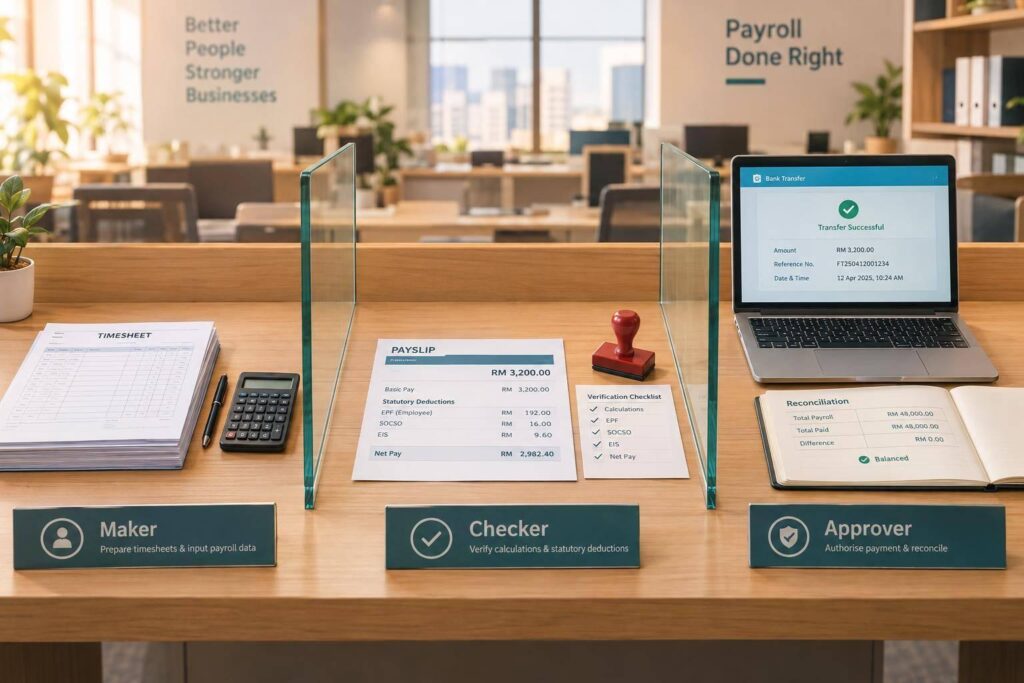

My starting rule for payroll: separate preparation, checking and payment release. For Malaysian SMEs, that means assigning 3 clear roles – maker, checker and approver – and never letting someone approve their own work.
I focus on these checks across the payroll cycle:
- Inputs and results: Approve timesheets and employee changes, then check payroll calculations, unusual payments and payslips.
- Statutory payments: Review EPF, SOCSO, EIS and PCB using current rules, and track submission and payment deadlines.
- Bank release: Match the bank file to the approved payroll. <u>Any change after approval needs another check and approval.</u>
- Reconciliation and records: Match payroll to bank and ledger records, keep dated approvals and resolve differences.
- Small or outsourced teams: Name deputies, limit access and use independent owner checks where duties overlap. For many, outsourcing payroll provides these built-in controls automatically.
Short on staff? I would keep the independent checks, not skip them. Test one completed payroll compliance cycle from approved inputs to payment and reconciliation.
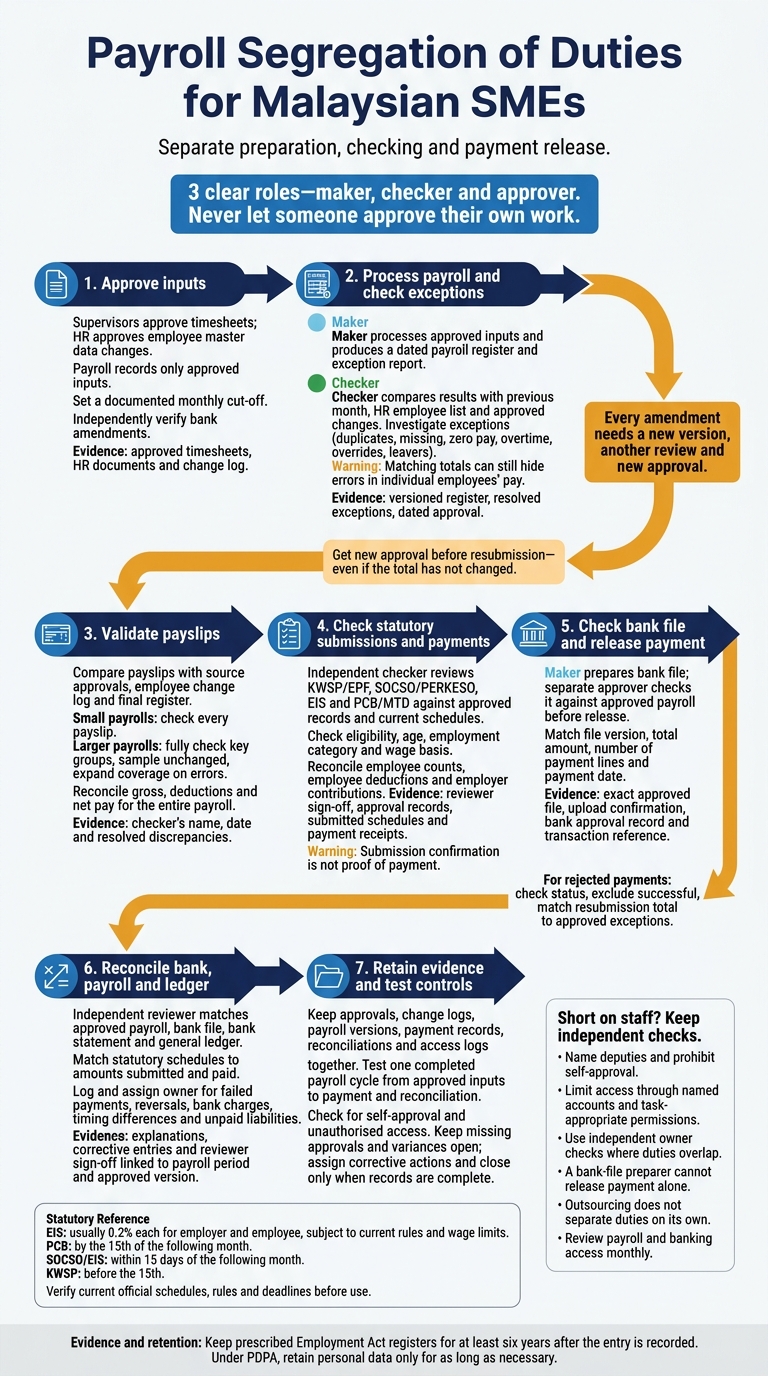
Payroll Segregation of Duties for Malaysian SMEs
Control Payroll Inputs and Check Payroll Results
Approve Timesheets and Employee Record Changes
Once roles are assigned, control payroll inputs before processing. Set a documented monthly cut-off for approved timesheets, overtime, leave, allowances, commissions and employee changes. Allow enough time to keep payroll on schedule, and accept inputs only through the designated system, form or folder.
Supervisors approve timesheets, HR approves employee master data changes, and payroll records only approved inputs. Before submission, supervisors should confirm the employee, pay period, hours worked, overtime rate or hours, leave type and dates, and any allowance or commission calculation. Log each item’s arrival date, supporting document and approver. Record whether it is included, deferred or logged as a late adjustment.
Match starters to approved hiring documents, leavers to authorised termination records, salary changes to approved variation letters, and bank changes to authorised employee requests. Check effective dates. Verify bank amendments using an HR-held contact number or an established HR process – not contact details supplied in the change request.
For late changes and overrides, keep the original and new values, reason, effective date, change date, requester, person entering the change and approver. Also record the affected payroll period and whether approval had already been given.
Process Approved Payroll and Review Exceptions
Process only approved inputs, then generate a dated payroll register and exception report. The register should show employee identifiers, gross pay, overtime, allowances, commissions, unpaid leave, employee deductions, employer contributions and net pay.
Use the exception review to test every approved input. Compare each employee’s results with the previous month, the HR employee list and approved changes. Investigate duplicate employees or bank accounts, missing employees, unexpected zero or negative net pay, unusual overtime, manual payroll overrides and payments to leavers. Matching totals can still hide errors in individual employees’ pay.
Assign each exception to a named owner and keep evidence explaining how it was resolved. A payment to a leaver may be valid final pay, but it still needs supporting approval.
Keep the checked register in a folder with editing restrictions, together with its version number, approval date and approver. Every amendment needs a new version, another review and new approval. Only the revised, reapproved register moves to payment.
Check Payslips Against Approved Payroll Data
Use the checked register as the source for payslip validation. Before releasing payslips, compare identity, pay period, basic salary, overtime, commissions, allowances, unpaid leave, deductions and net pay against source approvals, the employee change log and the final register. Match bank-account details to the approved payroll file before release, and use consistent RM formatting and rounding.
For small payrolls, check every payslip. For larger payrolls, fully check starters, returning employees, leavers, employees with pay or bank-detail changes, unusual payments and manual adjustments. Sample unchanged employees across departments, pay types and locations, and expand coverage when errors increase.
Reconcile gross pay, deductions and net pay for the entire payroll, even when payslip checks use sampling. Record the checker’s name, the date and all resolved discrepancies.
sbb-itb-ba278e7
Internal Controls | Payroll System
Review Statutory Deductions, Release Payments and Reconcile
Once the payroll register has been checked, move on to statutory submissions, payment release and reconciliation.
Check Malaysian payroll fees and statutory contributions
Have an independent checker review KWSP/EPF, SOCSO/PERKESO, EIS and PCB/MTD against approved HR records, the approved payroll register and current schedules. Check eligibility, age, employment category and wage basis. Reconcile employee counts, deductions and employer contributions with statutory schedules, keeping employee deductions separate from employer costs.
EIS is usually split 0.2% each between employer and employee, subject to current rules and wage limits. For PCB, use the current HASiL schedule or an approved computerised method.
Complete these checks before approving submission and payment. Track the filing deadlines: PCB by the 15th of the following month, SOCSO/EIS within 15 days of the following month, and KWSP before the 15th.
Keep reviewer sign-off, approval records, submitted schedules and payment receipts. Submission confirmation is not proof of payment.
Separate Bank-File Preparation From Payment Release
A separate approver should log in to the bank platform and check the uploaded file against the approved payroll. Match the file version, total amount, number of payment lines and payment date. Release payment only after this check.
Keep the exact approved file, upload confirmation, bank approval record and transaction reference.
Record amended or rejected lines as exceptions, including the rejection reason, correction evidence and approver. Get new approval before resubmission, even if the total has not changed. To prevent duplicate salary payments, check the bank’s payment status first, exclude successful payments and match the resubmission total to the approved exceptions.
Reconcile Payroll With Bank and Ledger Records
After payment release, reconcile the bank movement with the ledger and statutory filings. An independent reviewer should match the approved payroll against the bank file, bank statement and general ledger.
Check that gross wages, deductions, employer contributions and statutory liabilities sit in the correct accounts. Match statutory schedules to the amounts submitted and paid, and trace employee-record changes to authorised HR documents.
Record failed payments, reversals, bank charges, timing differences and unpaid liabilities, assigning each an owner and due date. Keep explanations, corrective entries and reviewer sign-off, with every record linked to the same payroll period and approved version.
Set Up Payroll Controls With Limited Staff
When one person handles several payroll steps, add compensating controls so someone else reviews their work. Keep checks across timesheets, employee changes, the payroll run, payslip review, statutory deductions, bank release and reconciliation.
Divide Payroll Duties in Small and Outsourced Teams
For each task, identify who prepares, checks, approves, releases or reconciles it. Name the person responsible for every step. Smaller teams need stronger checks where duties overlap.
| Arrangement | Control gap | Compensating controls |
|---|---|---|
| One payroll operator | One person may control the full cycle and change data without detection. | Owner independently checks headcount, salary changes, variances, statutory deductions and bank totals; a separate authorised approver releases payment; keep signed or system-recorded approvals |
| Two-person finance team | Leave cover can remove the maker/checker split. | Name deputies, prohibit self-approval, require owner review of salary or bank-detail changes, and independently review payroll-to-bank variances monthly |
| Externally supported payroll | Outsourcing can leave responsibilities unclear. | Client approves payroll inputs and outputs, independently confirms bank totals, controls bank release, reviews statutory confirmations and keeps records |
| Owner-managed company | The owner may both approve and release payments. | Require a second bank approver, keep payroll approval logs, arrange an independent quarterly payroll review, and record any unavoidable duty overlap |
Deciding when to outsource payroll does not separate duties on its own. The SME must still approve employee changes and timesheets, review payroll output, control bank release and keep evidence of those checks. Put access, correction, incident and record-return duties in writing. Specify who can view, edit and release each payroll record.
Set Access Rights and Approval Limits
Match controls to payroll size, complexity and payment risk. Separate employee-data changes from approval, payroll preparation from final approval, bank-file preparation from release, and ledger posting from reconciliation.
Use the matrix below to record named users, permissions, approval limits, required evidence and deputies. Base limits on payment risk, not just a fixed threshold.
Give each user a named account with access suited to their tasks. Deputies must not approve their own work. Set expiry and removal dates for temporary access, and promptly remove access that is no longer needed after staff or role changes. Review payroll and banking access monthly. Record approvals – verbal checks alone are not enough.
| Activity | Permissions and approval limits | Backup rule | Review frequency |
|---|---|---|---|
| Employee records | Maker edits; manager approves changes supported by evidence | Named deputy; no self-approval | Monthly and after staff changes |
| Salary and bank changes | Maker enters; authorised manager approves; bank details independently verified | No self-approval | Every change |
| Timesheets | Supervisor approves; maker inputs approved hours | Named deputy | Every cycle |
| Payroll results | Maker processes; checker reviews; owner approves exceptions | Independent reviewer | Every cycle |
| Bank files | Maker prepares; separate approver checks approved version | Named deputy; no self-approval | Every cycle |
| Payment release | Authorised signatory only; dual approval above documented risk threshold; preparer cannot release alone | Named deputy; no self-approval | Every payment |
| Ledger posting | Accounting user posts; reviewer checks against approved register | Independent reviewer | Every cycle |
| Reconciliation | Reviewer checks bank, payroll and ledger; owner reviews unresolved items | Independent reviewer | Every cycle |
| Payroll audit logs | Administrator maintains access; independent reviewer inspects protected logs | Independent reviewer | Monthly or quarterly |
Keep Audit Records and Test Payroll Controls
Keep a cycle evidence checklist and change logs that show who changed what, when, the old and new values, why the change was made and who approved it. Include approved timesheets and HR changes, registers and exceptions, payslip checks, statutory calculations and payment confirmations, bank-file versions and approvals, ledger entries, reconciliations, corrections and access logs.
Restrict access, protect logs and secure backups. Keep prescribed Employment Act registers for at least six years after the entry is recorded. Under PDPA, retain personal data only for as long as necessary.
Review and reconcile every cycle. Monthly or quarterly, depending on risk, test selected starters, leavers, salary changes, overtime and manual adjustments. Trace each item from source approval through calculation, payslip, payment and ledger reconciliation. Check for self-approval and unauthorised access. Record failures, assign corrective actions and retest after changes to the system, provider or bank workflow.
Conclusion: Separate Payroll Duties and Keep Records
Separate payroll preparation, approval and payment release, with named maker, checker and approver roles. Check payslips and statutory deductions independently. If staffing is limited, document owner oversight as a check and restrict access.
With these controls in place, use one completed payroll cycle to test the process from input to reconciliation. Check that every stage has a named owner, date and supporting record. Match the approved payroll register against the bank file, bank confirmation and ledger. Keep these records together so you can trace each payment back to its approved inputs.
After the test, close only items with full supporting records. Keep missing approvals and unexplained variances open. Assign an owner to each open item, record the fix and close the cycle only once all items are resolved.
FAQs
How can I separate payroll duties with only two staff?
Assign one person to enter timesheets and prepare payroll data. Have the other review payroll and release the bank file. The payroll processor should not authorise final payment.
Alternatively, outsource payroll to LBCO to handle calculations, statutory deductions and bank file preparation. Keep final approval of all payroll data with your team before it is finalised.
What should I do if a payroll error is found after payment?
Recheck the payslip, payroll calculations and released bank payment file. Correct the source inputs – timesheets, overtime and leave – then review statutory deductions. Rerun payroll to confirm the totals and statutory amounts.
Update the audit trail records and monthly reports to show what was paid. You stay in control: use your internal approval step to confirm the corrected payroll before making any further payment adjustments.
How can I keep payroll audit records without exposing employee data?
Use secure, cloud-based payroll systems with ISO 27001 certification, and limit access to authorised personnel. Keeping records in one secure digital system makes changes easier to track and maintains a clear audit trail for reconciliation, without exposing employee data to users who lack permission.
Outsourcing payroll to professional service providers can also give you access to secure systems and compliance expertise, helping keep records accurate and confidential.