


If I buy services from an overseas supplier for my Malaysia business, I need to issue the self-billed e-invoice myself. The foreign supplier does not do it in MyInvois. The due date is based on the earlier of two dates: when I pay, or when I receive the supplier’s invoice. Then I must submit it by the last day of the next month.
Here’s the short version:
- Who issues it? I do, as the Malaysian buyer.
- What counts? SaaS, digital ads, foreign consulting, design, web, and other overseas services.
- What is the trigger date? The earlier of:
- payment date, or
- supplier invoice receipt date
- When is it due? By the end of the following month.
- What do I need?
- supplier name and country
- foreign invoice details
- service description and period
- foreign currency amount and RM amount
- contract or agreement
- payment proof
- What gets checked most?
- self-billed flag
- issuer field
- dates
- currency and RM figures
- supplier details
- How long do I keep records? 7 years
- What is often done wrongly?
- putting the foreign supplier as issuer
- missing the deadline
- leaving supplier details incomplete
- mixing up imported services with imported goods
A simple example: if the trigger date is 14/09/2026, the deadline is 31/10/2026. If the trigger date is 05/10/2026, the deadline is 30/11/2026.
Imported services and imported goods are not handled the same way. For services, I issue a self-billed e-invoice in MyInvois. For goods, the process follows customs rules instead.
Self-billed e-Invoice for Foreign Transactions
sbb-itb-ba278e7
Quick Comparison
| Item | Imported services | Imported goods |
|---|---|---|
| What it covers | Services from overseas suppliers | Goods brought into Malaysia |
| Who handles the e-invoice side | Malaysian buyer | Customs-based process |
| Trigger basis | Earlier of payment date or invoice receipt date | Customs import event |
| Main deadline focus | End of next month after trigger month | Follow goods import timing rules |
In short, this process is mostly about getting the issuer, trigger date, amount, and records right the first time. That cuts filing errors, late submission risk, and audit questions later.
1. How to Issue a Self-Billed E-Invoice for Imported Services
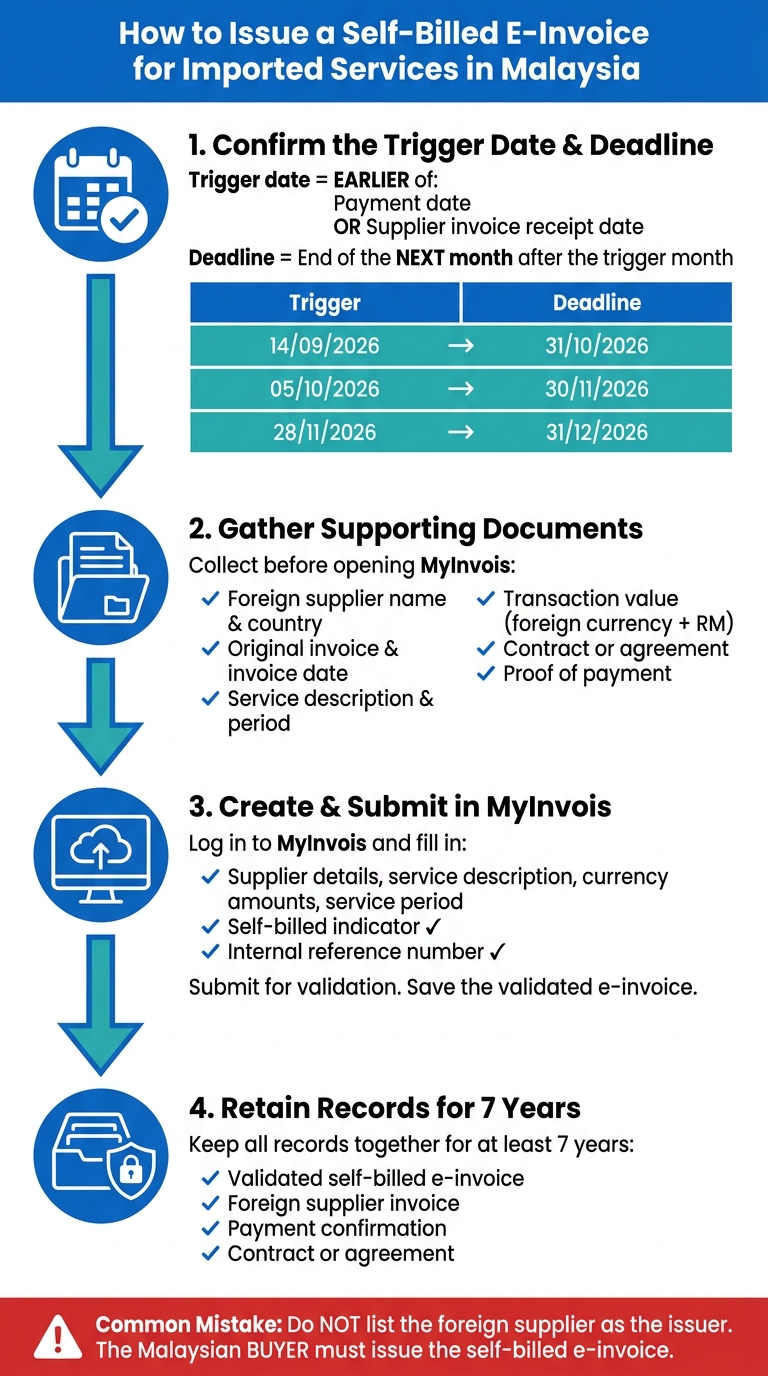
How to Issue a Self-Billed E-Invoice for Imported Services in Malaysia
When you buy services from an overseas supplier, the Malaysian buyer has to issue the self-billed e-invoice. In MyInvois, the process is quite direct if you handle it in the right order.
Step 1: Confirm the trigger date and deadline
Start with the trigger date. This is whichever happens first:
- the date you paid the foreign supplier
- the date you received their invoice
That earlier date sets your filing window.
You must issue the self-billed e-invoice by the end of the month after the month of the trigger date.
| Trigger Month | Example Trigger Date | Self-Billed E-Invoice Deadline |
|---|---|---|
| September 2026 | 14/09/2026 | 31/10/2026 |
| October 2026 | 05/10/2026 | 30/11/2026 |
| November 2026 | 28/11/2026 | 31/12/2026 |
A simple way to think about it: if the trigger date falls on 14/09/2026, your deadline is 31/10/2026. If it falls on 05/10/2026, your deadline moves to 30/11/2026.
Step 2: Gather the foreign supplier invoice and supporting documents
Before you open MyInvois, get your papers in place. That saves time and cuts down on input mistakes.
You should have:
- Foreign supplier’s full name and country
- Original invoice and invoice date
- Clear service description
- Service period, if any
- Transaction value in foreign currency and RM
- Contract or agreement
- Proof of payment, such as bank transfer confirmation
Once these source documents are ready, you can key in the transaction details in MyInvois without having to stop halfway and dig through old emails or bank records.
Step 3: Create and submit the self-billed e-invoice in MyInvois
Log in to MyInvois and create a self-billed e-invoice. Then fill in the supplier details, service description, currency amounts, and service period.
Pay close attention to the self-billed indicator and your internal reference number before you submit. Small fields like these are easy to skip, but they matter.
After that, submit the e-invoice for validation. Once it is validated, save the validated e-invoice for tax and audit records.
Then move that record into your retention file.
Step 4: Retain the validated record and supporting documents
After validation, keep all related records together:
- the validated self-billed e-invoice
- the foreign supplier invoice
- the payment confirmation
- the contract
Retain these records for at least 7 years. This gives you a clear audit trail for the imported service.
2. Required Fields to Fill In Correctly
For imported services, MyInvois needs to match the foreign invoice and payment trail exactly. That means the details in MyInvois should line up with the foreign invoice and the payment records you gathered earlier. Even small differences can lead to validation errors or audit queries.
Foreign supplier and transaction details
Enter the supplier’s name, country, and foreign address based on the foreign invoice and supporting documents. In practice, use the invoice for the supplier details, then cross-check them against the contract or payment record.
The invoice reference number, invoice date, and service description should also match the supplier’s original invoice. Keep the service description clear and specific, so the transaction is easy to trace later.
Amounts, currency, and service period
These fields set out the taxable transaction period and value. Record the transaction amount in the foreign currency stated by the supplier, and also include the equivalent amount in Malaysian Ringgit. Use RM12,500.00 format.
Fill in the service period too, including both the start date and end date of the service. Enter those dates in DD/MM/YYYY format.
Self-billed indicators and internal references
Select "Self-Billed" in MyInvois and link the record to the foreign invoice, payment voucher, and ledger entry. Keep those internal references connected to the MyInvois record, the invoice, the payment voucher, and the ledger entry so your audit trail stays clear.
With those fields filled in, the next point is how imported services differ from imported goods.
3. Imported Services vs Imported Goods: Key Differences
Imported services and imported goods do not follow the same e-invoicing rules. After you fill in the MyInvois fields, the next step is to decide how the transaction should be treated. Is it an imported service, or is it an imported good?
That sounds simple, but this is where many tax compliance errors start. If you classify the transaction wrongly, you can end up applying the wrong rule set. And that leads to filing errors, because imported services and imported goods are checked differently.
The main difference comes down to who issues the e-invoice.
For imported services, the Malaysian buyer must issue a self-billed e-invoice in MyInvois. Imported goods do not work that way. They follow a separate customs-based process. This split matters at filing stage, since each type is reviewed under different rules.
Another point that trips people up is the trigger basis. For imported services, the trigger date is based on the earlier of the payment date or the date the supplier invoice is received. Imported goods are different. They follow customs event timing, not payment timing or invoice receipt.
Differences in issuer, trigger date, and timing
| Item | Imported services | Imported goods |
|---|---|---|
| Transaction type | Services received from a foreign supplier | Goods brought into Malaysia |
| Who issues the e-invoice | Malaysian buyer issues a self-billed e-invoice | Customs-based process |
| Trigger basis | Earlier of payment date or receipt of supplier invoice | Customs-related import event rules apply |
| Timing focus | By the end of the following month from the earlier trigger month | Follow the timing rules applicable to imported goods |
These rule differences are the main reason filings go wrong. The next part looks at the common errors that lead to rejections or late filings.
4. Common Filing Mistakes and a Pre-Submission Checklist
Mistakes that lead to rejected or late filings
Once you’ve gone through the filing steps and filled in the required fields, the biggest risk usually comes down to plain submission mistakes.
Most rejections happen for three reasons: the wrong issuer is selected, the filing misses the deadline, or the transaction details are incomplete.
The mistake that shows up most often is listing the foreign supplier as the issuer. For imported services, the Malaysian buyer must issue the self-billed e-invoice. If the issuer field is entered wrongly, the submission will be rejected.
Another common problem is missing the deadline. Late filings can lead to penalties.
A third issue is incomplete supplier details. This can mean the supplier name, address, or tax ID is missing from the invoice. Some SMEs also classify imported services as imported goods by mistake. That matters because imported goods are not filed as self-billed e-invoices.
Final checklist and key takeaways
Use this final check to confirm the details you’ve already gathered.
| Checklist Item | What to Confirm |
|---|---|
| Issuer field | Malaysian buyer selected as self-billed issuer |
| Dates | Payment date, foreign supplier invoice date, and trigger date match |
| Supplier details | Name, address, country, and tax ID on the invoice |
| Financials | Currency, exchange rate, and MYR total match source documents |
| Self-billed flag | Selected correctly in MyInvois |
| Document match | Invoice, payment proof, and service agreement align |
A quick review here can save a lot of back-and-forth later. One wrong field, and the whole filing can bounce back. It sounds minor, but this is where many teams get tripped up.
FAQs
What if I paid a deposit first?
If you paid a deposit for imported services, you still need to issue a self-billed e-invoice for tax purposes.
Make sure the deposit is clearly recorded in your financial records. Under Malaysian tax rules, businesses must keep detailed records for at least seven years. If you need a hand, your dedicated accountant at LBCO can help with the MyInvois process.
Which exchange rate should I use for the RM amount?
Use the exchange rate in effect on the date the self-billed e-invoice is issued to convert the foreign currency amount into RM.
The rate must match one published by Bank Negara Malaysia or another verifiable source, so your records stay compliant.
What happens if I submit the self-billed e-invoice late?
Late submission of a self-billed e-invoice can lead to penalties, including fines of up to RM20,000.
To stay out of trouble, follow the filing deadlines closely and keep your compliance calendar up to date. If a delay looks likely, get professional help early so you can manage your reporting duties properly.